
Pokémon
Korean cards · Japanese prices · Official news
Explore PokémonOFFICIAL NEWS
[Korea] Spooky Flame accessories announcedFOR THE LOVE OF CARDS
Measure both sides with two photos. Compare your centering with the published PSA, CGC and BGS reference ranges.
Local photo correction · Private report storage when signed in
Start with photos of both sides.
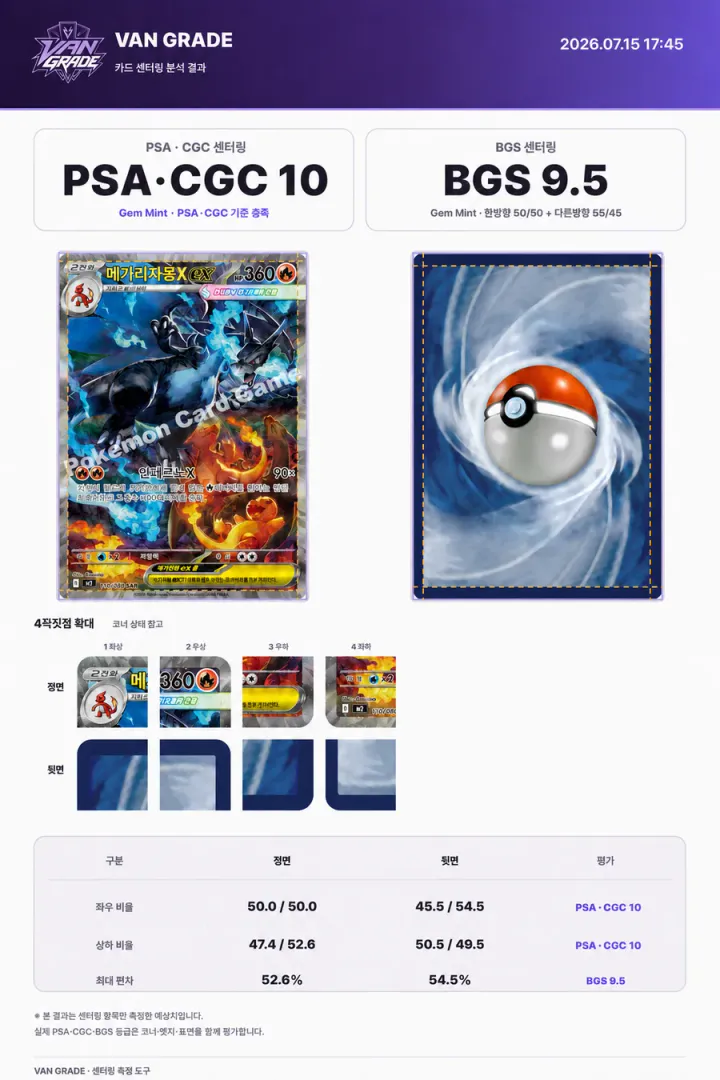
A measurement example. Centering alone does not guarantee a grading result.
FIND YOUR GAME
YOUR NEXT CARD
HOW IT WORKS
Place the card on a flat surface and shoot it from directly above. JPG, PNG and WebP are recommended.
Align the four corners so a tilted photo can be measured accurately.
Move eight guide lines to review the horizontal and vertical centering ratios.
BEFORE YOU GRADE
Correct rotation and perspective, compare front-and-back centering ratios, and review published grading reference ranges.
Results guide your centering review. Final grades also depend on corners, edges and surface condition.VAN GRADE ANALYSIS
Corners · Edges · Surface
Yes. You can measure both sides without registration or installation.
Centering compares the print area’s left/right and top/bottom margins. Align the guide lines with your card’s borders to calculate the ratios.
No. Upload front and back photos and start measuring, regardless of the card game.
No. The result compares centering with published reference ranges. Professional grading also considers corners, edges and surface condition.
Photos are processed in your browser. When signed in, completed report images containing front/back photos are automatically saved to your account for later download. Signed-out photos stay on this device.
Yes. Catalog & prices combines Korean card artwork and identities with Japanese raw/PSA 10 reference prices. Japanese prices can differ from Korean-edition sale prices.
HEIC support varies by browser. Convert the photo to JPG, PNG or WebP, or choose Most Compatible in the iPhone camera’s format settings.